Your CRM Is Your Marketing Engine — Why Most Businesses Get This Wrong
Ask a business owner what their CRM does, and most will say “it stores our contacts.” That answer reveals exactly why their marketing isn’t working as well as it should.
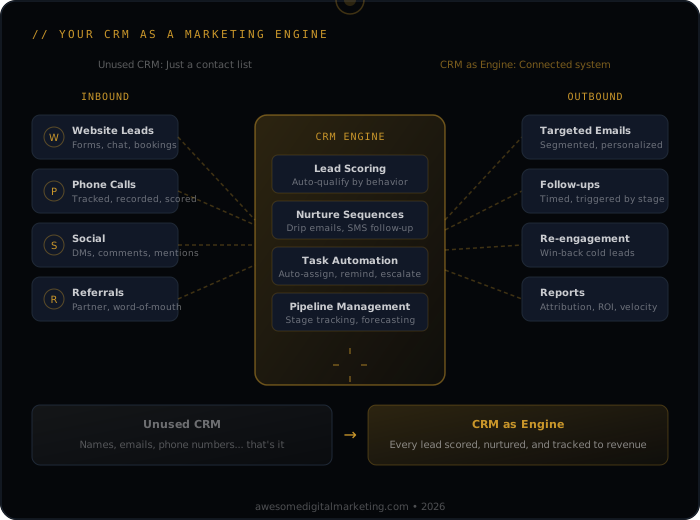
A CRM isn’t a contact database. It’s the operating system that connects every marketing dollar to every closed deal. When it’s set up correctly, it tells you which campaigns produce revenue, which leads need attention, and where your pipeline is leaking. When it’s set up poorly — or not at all — you’re flying blind.
Why Does Your CRM Matter for Marketing?
The Attribution Problem
Here’s a scenario that plays out daily: A potential customer sees your Google ad, visits your website, reads a blog post, leaves, comes back a week later through an organic search, fills out a form, gets a follow-up call, and becomes a customer six weeks later.
Which marketing channel gets credit for that sale? Without a CRM that tracks the full journey, the answer is usually “whatever happened last” — or worse, “we don’t know.”
This matters because marketing decisions are budget decisions. If you can’t attribute revenue to channels, you can’t know whether your SEO investment, your ad spend, or your content marketing is producing the best return. You end up allocating budget based on gut feeling instead of data.
The Lead Leakage Problem
Every business leaks leads. Forms get submitted and nobody follows up. Phone calls come in during busy hours and don’t get logged. Estimates go out and never get a follow-up. Website visitors show buying intent but never get contacted.
A properly configured CRM catches these leaks:
- Every form submission creates a contact with source attribution
- Every phone call gets logged (ideally automatically through call tracking integration)
- Every estimate gets a follow-up sequence
- Every website visitor who hits key pages gets flagged for outreach
The difference between businesses that grow and businesses that plateau is often not more leads — it’s fewer lost leads.
The Follow-Up Problem
The average lead needs 5-8 touches before they’re ready to buy. Most businesses give up after one or two. Not because they don’t care, but because manual follow-up doesn’t scale.
A CRM with automated sequences solves this:
- Day 1: Thank you email + next steps
- Day 3: Follow-up with additional value (case study, guide, FAQ)
- Day 7: Check-in + direct question about timeline
- Day 14: Re-engagement with new angle
- Day 30: Long-term nurture enrollment
This isn’t spam. It’s systematic persistence that respects the buyer’s timeline while keeping your business top of mind — but none of this works if your emails don’t arrive. See our complete email deliverability guide to make sure your messages actually reach the inbox. The businesses with the highest close rates aren’t the ones with the best sales pitch — they’re the ones that follow up consistently.
What Should Your CRM Actually Do?
Track the Full Customer Journey
From first touch to closed deal, your CRM should record:
- Source — how did this person find you? (Google Ads, organic search, referral, social media)
- Engagement — what content did they consume? Which pages did they visit? Which emails did they open?
- Pipeline stage — are they a new lead, a qualified prospect, an active opportunity, or a customer?
- Communication history — every email, call, text, and meeting in one place
- Revenue — what did they buy, when, and for how much?
This journey data is what makes analytics and reporting meaningful. Without it, analytics can only tell you about website traffic. With it, analytics can tell you about revenue.
Automate What Humans Forget
Humans are bad at consistent follow-up. CRMs are built for it. Automate:
- Lead response — instant acknowledgment when a form is submitted or a call is missed
- Nurture sequences — scheduled follow-ups based on pipeline stage
- Review requests — automated ask after a job is completed or a service is delivered
- Re-engagement — reach out to dormant leads or past customers on a schedule
- Internal alerts — notify your team when a high-value lead takes action
Automation doesn’t replace the human relationship. It ensures the human relationship doesn’t depend on someone remembering to send an email. See how marketing automation builds a 24/7 lead generation engine for service businesses that need their pipeline running while they’re focused on client work.
Score and Prioritize Leads
Not every lead is equal. A CRM with lead scoring helps your team focus on the prospects most likely to close:
- Demographic fit — do they match your ideal customer profile?
- Behavioral signals — have they visited your pricing page? Downloaded a guide? Requested a quote?
- Engagement recency — a lead who opened your email today is warmer than one who went silent two weeks ago
- Source quality — leads from certain channels may close at higher rates
When your sales team knows which leads deserve their time, close rates go up and wasted effort goes down.
Connect Marketing to Revenue
This is where most CRM setups fail. The marketing team tracks leads. The sales team tracks deals. Nobody connects the two. So nobody can answer the most important question: “Which marketing activities produce the most revenue?”
A connected CRM makes this possible:
- Every closed deal traces back to its marketing source
- Cost per acquisition is calculated by channel, not just overall
- Lifetime value is tracked by acquisition source
- ROI by campaign is reported in real dollars, not just lead counts
When your paid advertising reports show “we spent $5,000 on Google Ads and generated $47,000 in closed revenue,” you have a fundamentally different conversation about budget than when they show “we got 200 clicks and 15 form fills.”
What Are the Most Common CRM Mistakes?
Treating It as a Rolodex
If your CRM is just a list of names and phone numbers, you’re using a spreadsheet with extra steps. The value of a CRM is in the automation, the journey tracking, and the reporting — not the contact records.
No Data Hygiene
Duplicate records, incomplete profiles, outdated information, and inconsistent formatting make your CRM unreliable. If your team doesn’t trust the data, they stop using the system. Establish data entry standards and clean your database quarterly.
Over-Automating Too Soon
Automation is powerful, but automating a broken process just breaks things faster. Before automating:
- Map the process manually — understand every step
- Fix the process — remove unnecessary steps, clarify handoffs
- Then automate — replicate the improved process at scale
No Integration with Marketing Channels
A CRM that doesn’t connect to your website forms, ad platforms, email tool, and phone system is only capturing a fraction of the picture. Key integrations:
- Website forms → CRM (automatic lead creation with source tracking)
- Call tracking → CRM (call recordings and lead attribution)
- Ad platforms → CRM (offline conversion data feeds back to optimize campaigns — see how CRM integration closes the attribution loop)
- Email marketing → CRM (engagement data informs lead scoring)
Ignoring the Sales Team’s Input
Marketing sets up the CRM. Sales is supposed to use it. If sales wasn’t involved in the setup, they’ll fight the system. Include your sales team in:
- Pipeline stage definitions — they know what qualifies a lead
- Required fields — keep it minimal so they actually fill things out
- Reporting needs — what data do they want to see?
- Workflow design — how does a lead move through their process?
How Does AI Change CRM Strategy?
AI is transforming what CRMs can do — but only for businesses that have their data foundation in place.
Predictive Lead Scoring
Instead of rule-based scoring (“visited pricing page = +10 points”), AI analyzes patterns across all your closed deals and identifies which lead characteristics and behaviors predict conversion. This gets smarter over time as it learns from your specific data.
Intelligent Automation
AI can determine the best time to send follow-up emails, which content to include based on the lead’s behavior, and when a lead is ready for a sales call. This goes beyond simple “if/then” automation to genuinely adaptive communication.
Conversation Intelligence
AI-powered call analysis can automatically log call summaries, identify buying signals, flag objections, and score call quality. Your CRM stays updated without requiring your team to manually log every interaction.
Revenue Forecasting
Based on pipeline data, historical close rates, and current engagement patterns, AI can forecast revenue with increasing accuracy — helping you plan capacity, budget, and growth.
These capabilities are what AI-powered marketing looks like in practice — not a separate tool, but intelligence embedded into the system your team already uses.
Where Should You Start?
If your CRM is a mess — or you don’t have one — here’s the priority order:
- Pick a CRM and commit. The best CRM is the one your team will actually use. Don’t over-buy features you won’t implement.
- Import and clean your contacts. Deduplicate, standardize, and tag by source and status.
- Connect your website forms. Every form submission should create a CRM contact with source attribution. No more checking a shared inbox.
- Set up one automated sequence. Start with new lead follow-up — the highest-impact automation you can build.
- Integrate call tracking. Know which marketing channels drive phone calls, not just form fills.
- Build your first attribution report. Even a simple “leads by source by month” report changes how you think about marketing spend.
Your CRM is either your marketing engine or your most expensive contact list. The difference is whether it’s connected, automated, and measured — or just collecting dust.
Want to see how your marketing systems stack up? Run a free AI Visibility scan — it checks your digital presence across the signals that matter to both search engines and AI.