CRM Integration for Lead Attribution: Link Leads to Closed Deals
A lead is only useful in attribution if it survives the handoff. The original event, form submission, call, webinar, trade show scan, or booked consultation has to stay connected to the CRM contact and then to the deal that eventually closes.
That link can break when the marketing dashboard shows leads and the CRM shows opportunities and closed-won revenue without a durable association between them. If the contact, deal, source, and close fields are not connected, the report cannot reliably show which recorded lead sources produced customers.
CRM integration for lead attribution is the system that closes that gap. It connects the first source record to the sales record, keeps the association intact through the pipeline, and makes closed-deal reporting possible without spreadsheet archaeology.
Your CRM knows about revenue. Your analytics stack knows about visits, forms, calls, and events. Closing the attribution loop means making those two stories refer to the same person, the same opportunity, and the same outcome.
How Do You Link Event Leads to Closed Deals in CRM Attribution?
Start with the source record, not the report. If “event lead” means a trade show, webinar, lunch-and-learn, or referral event, create a campaign or event source in the CRM and attach every attendee, scan, meeting, and follow-up to it. If it means a website conversion event, preserve the event name, page, UTM fields, click IDs where present, and a stable visitor or form submission ID.
Then carry that record forward:
| Step | What to preserve | Why it matters |
|---|---|---|
| Lead capture | Source, event/campaign name, landing page, UTM fields, form or call ID, click ID when present | Keeps the original lead source from becoming “unknown” later |
| CRM contact | Contact ID, email/phone, company/account, consent status, first source, latest source | Gives sales one durable person or account record |
| Deal creation | Deal/opportunity ID, associated contact(s), pipeline, owner, create date, source fields | Connects the lead to real pipeline instead of a loose activity log |
| Stage changes | Qualified, meeting booked, proposal sent, closed-won, closed-lost, timestamps | Shows which sources create qualified movement, not just raw leads |
| Closed-won record | Close date, amount, product/service, original source, influenced source | Lets reports tie revenue back to the event or lead source that started the journey |
The important part is the association. A closed-won deal with no associated contact cannot reliably inherit the contact’s source history. A contact with source history but no deal association will look like marketing activity with no revenue. The CRM integration has to preserve both.
For event attribution, lock the event source before follow-up begins. For website attribution, capture the source and visitor identifiers before the form redirects. In both cases, the source should remain visible when the opportunity closes weeks or months later.
Why Does Attribution Break Before Closed Won?
Marketing tools track what happens before the sales process: page views, form submissions, phone calls, webinar registrations, event scans, purchases, and custom events. When someone becomes a lead, the website or event system can record that conversion.
What happens after the lead is captured, including the sales call, proposal, negotiation, and close, usually lives in the CRM rather than the original form or event page. If the CRM does not preserve source and deal associations, the closed deal disconnects from the lead that created it.
So teams optimize for the signal they can see: form fills, badge scans, booked calls, or lead count. A qualified buyer can look identical to a lead who never responds.
The result: marketing gets better at generating leads, but not necessarily better at generating customers. The measurement target is incomplete.
How Does Closed-Loop CRM Attribution Work?
The concept is straightforward: when a lead in your CRM reaches a meaningful stage such as qualified, proposal sent, or closed/won, the CRM records that milestone against the original source and sends the event to the systems that need it.
The technical flow:
- Lead is captured through a form, call, event scan, webinar signup, meeting booking, or imported list
- Lead enters your CRM with source tracking: UTM parameters, event/campaign name, landing page, referrer, click ID, and/or submission ID
- Sales works the lead. Days, weeks, or months pass
- The contact is associated with a deal or opportunity as soon as real pipeline exists
- The deal reaches a milestone such as qualified, proposal sent, closed-won, closed-lost, or revenue recorded
- The integration forwards or stores the event in the reporting warehouse, GA4, offline conversion import, CAPI endpoint, or dashboard layer as needed
- Reporting learns which sources produce actual customers, not just leads
Once this loop is running, reporting gets more useful feedback than “somebody became a lead.” You can see which sources create qualified pipeline, which sources stall, and which sources become revenue.
For GA4, Google’s Measurement Protocol documentation describes server-to-server and offline event collection as a supplement to normal tagging, not a replacement for it. That distinction matters: the CRM feedback loop works best when website tags, server events, and CRM stage changes all refer to the same person, session, or opportunity record.
What Data Needs to Flow Back?
At minimum, you need to send:
- Source and platform identifiers: UTM fields, submission IDs, and supported click or browser identifiers, such as a Google Click ID (gclid), when they are available and allowed
- Conversion event name: “qualified_lead,” “closed_won,” “revenue_recorded,” or another stage that matters in the pipeline
- Normalized customer identifiers: email address or phone number, hashed when the receiving platform requires it and only when consent and policy allow
- Conversion value: the actual or approved proxy value when the account is ready to optimize toward value instead of raw lead count
Google’s offline conversion documentation now recommends enhanced conversions for leads through the Data Manager API for current and future uploads. Since June 15, 2026, older Google Ads API upload access has been limited to developer tokens with qualifying prior activity. Treat CRM feedback as a maintained data flow with diagnostics and ownership, not a one-time CSV or webhook project.
The Click ID Problem
The biggest implementation challenge is capturing and storing click IDs. When a visitor lands on your site from a Google Ad, the URL contains a gclid parameter. That parameter needs to travel from the landing page, through your form, and into your CRM as a hidden field.
If you lose the gclid between click and CRM entry, you cannot close the loop for that lead through click-based matching. This is why proper form and tracking setup matters from day one. It is much harder to retrofit than to build correctly.
Most form builders and CRM platforms support hidden fields that auto-capture URL parameters. Set this up once and it works for every lead going forward.
How Do You Connect Your CRM to Server-Side GTM?
The Webhook Approach (Most Common)
Many modern CRMs support outbound webhooks, which are automated HTTP requests triggered when a record changes status. The setup:
- In your CRM, create a workflow trigger such as “When lead status changes to Qualified.”
- Configure the webhook to send the event to an authenticated integration endpoint. That may be a server-side GTM client built for the payload or a separate API service.
- Include only approved fields: event name, available source identifiers, normalized customer data when permitted, conversion time, currency, and value.
- In the integration layer, validate, log, deduplicate, and forward the event through the current Google Ads, Meta CAPI, analytics, or reporting path.
- Test with a known lead and verify the conversion appears in both your ad platform and CRM
This works with any CRM that supports webhooks: HubSpot, Salesforce, ActiveCampaign, Pipedrive, Zoho, or any platform with workflow automation and HTTP request capabilities.
The Direct API Approach
For larger implementations, you can skip sGTM and send conversions directly to each platform’s API:
- Google Ads: Enhanced conversions for leads or offline conversion imports through Data Manager API or the current supported integration path
- Meta: Conversions API using the current supported dataset and event configuration
- LinkedIn: Conversions API
This requires developer resources but gives you the most control over timing, batching, and error handling.
Hybrid Approach
Some businesses use their CRM’s native integrations for one platform and server-side webhooks for others. There is no single right answer. Use whatever gets the right data flowing reliably, with clear consent and match-quality checks.
What Changes When the Loop Is Closed?
Bidding Shifts to Quality
Google’s Smart Bidding and Meta’s automated campaigns can optimize from a better definition of success. Your cost per form fill may move up or down. The more important question is whether the account is learning from qualified pipeline and revenue instead of raw lead count.
Budget Allocation Gets Smarter
You can finally see which campaigns, ad groups, and keywords produce revenue, not just leads. Cheap lead volume is not automatically good. Smaller lead volume from the right intent can be worth more when it turns into qualified opportunities.
Reporting Becomes Meaningful
Your marketing dashboard can now show end-to-end movement: ad spend, leads, qualified leads, customers, and revenue. This gives the team stronger evidence about marketing’s contribution while keeping attribution limits visible.
What Are the Common Pitfalls?
Not preserving source identifiers from day one. Retrofitting source capture is difficult. Store UTMs, submission IDs, landing-page context, and supported click identifiers when present. A missing click ID can prevent click-based matching, but other first-party source evidence may still support reporting.
Sending conversions too late. Import windows, conversion settings, and diagnostic requirements vary by platform and account. If your sales cycle is long, send meaningful intermediate stages such as qualified lead or proposal sent early enough for the platform’s configured conversion window instead of waiting only for closed-won revenue.
Forgetting about time lag. A lead generated in January might not close until April. Use lead-cohort and close-period views where appropriate so the delay between first touch and outcome is visible instead of forcing every question into one date window.
Over-engineering the pipeline. Start with one downstream event (qualified lead or closed won) feeding back to one platform (Google Ads). Get that working reliably before adding more stages, more platforms, and more complexity.
Not handling customer data correctly. Customer identifiers such as email and phone need to be normalized, hashed, consent-aware, and sent only through approved platform fields. Many server-side templates handle part of this automatically, but verify it. Sending raw or mismatched customer data is a compliance and measurement issue.
How Does the Full Stack Come Together?
With the feedback layer in place, your tracking architecture looks like this:
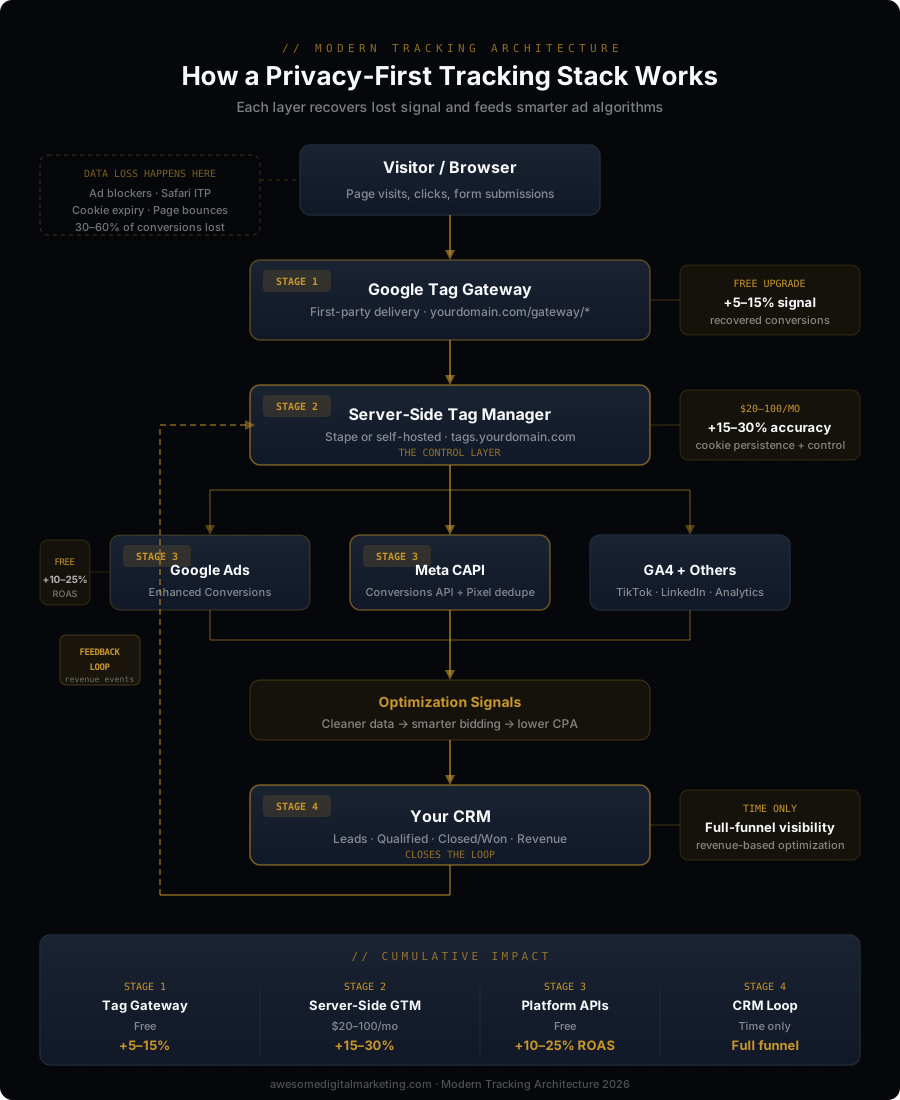
- Google Tag Gateway - first-party delivery support for Google tags
- Server-side tracking - a control layer for event quality, routing, and consent-aware data flow
- Meta CAPI + enhanced conversions - cleaner cross-platform signals when browser tracking is incomplete
- CRM integration - qualified-lead, pipeline, and revenue feedback from the sales system
Each layer supports the same goal: better inputs. The impact comes from giving analytics, dashboards, and ad platforms a clearer view of what happened after the first conversion.
The purpose is not to collect more data. It is to give platforms and teams a consistent definition of a useful outcome.
See where you stand with a free AI Visibility scan.