The 2026 Marketing Stack: Six Systems That Need to Work Together
Disclosure: We earn a commission if you sign up for HighLevel through the links in this post. It does not change our recommendation.
Most marketing stack articles are shopping lists.
They name dozens of tools, sort them into categories, and quietly turn a systems problem into a subscription problem.
That is backwards.
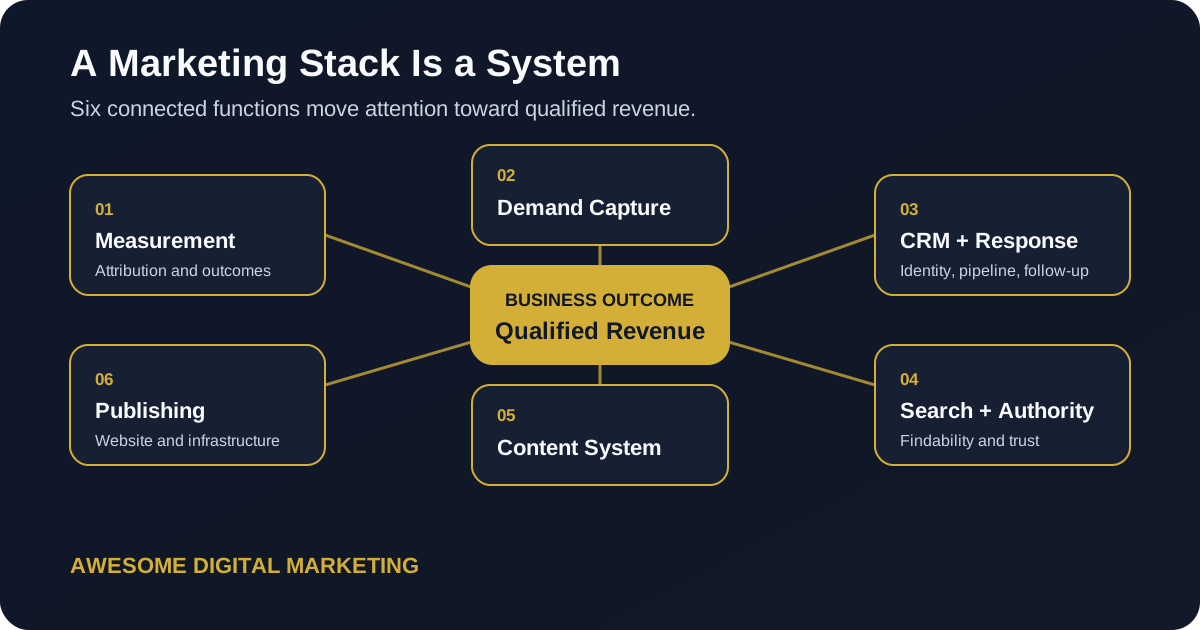
A marketing stack is useful only when the parts share enough context to move a person from first touch to qualified opportunity to revenue. If the CRM cannot identify the campaign that created the lead, the reporting layer is weak. If the website captures a lead but the response system stays silent, the automation layer is weak. If content earns attention but has no next step, the distribution layer is weak.
The logo collection does not matter. The handoffs do.
What Should a Marketing Stack Do in 2026?
A useful stack should answer four questions:
- Where did this person come from?
- What did they do next?
- Did they become a qualified opportunity or customer?
- What should the business change because of that result?
Everything else supports those answers.
That sounds obvious, but most stacks are assembled one urgent purchase at a time. A team buys a form tool because the website needs a form. Then a scheduler. Then a CRM. Then an email platform. Then a dashboard. Each purchase solves a local problem while creating another handoff.
By the time the stack is “complete,” the business has six versions of the customer and no reliable view of the journey.
We approach stack design through the six systems in our Marketing Systems architecture. A tool earns a place when it performs a required job, fits the operating process, and can exchange the data the next system needs.
Which Six Systems Belong in the Stack?
The exact products will change. These functions do not.
1. Measurement and Attribution
This layer records meaningful behavior and connects it to outcomes.
At minimum, it should capture traffic source, key website actions, lead creation, qualification, and closed revenue. Google Analytics uses events to measure interactions and build reporting, but event collection alone does not create business attribution. The event names, identifiers, consent model, CRM connection, and revenue feedback all need deliberate design. Google’s own GA4 event documentation is a useful technical reference.
We go deeper in our guide to GA4 funnel tracking and the full lead journey.
2. Paid and Organic Demand Capture
This layer creates and captures intent.
It includes paid search, paid social, organic search, referral traffic, and the landing experiences that turn attention into an identifiable lead. The tools matter less than the connection between the campaign, the page, and the lead record.
For search visibility, Google Search Console’s Performance report shows how a site appears in Google Search, including query and page performance. That data belongs beside paid campaign data and CRM outcomes, not in a separate reporting universe.
3. CRM and Lead Response
The CRM is where an anonymous marketing event becomes a business relationship.
It should hold the contact record, original source, consent, conversation history, pipeline stage, next action, and revenue outcome. It should also trigger the response process: confirmations, reminders, follow-up, routing, and alerts.
This is why we call the CRM the marketing engine. A contact database stores names. A marketing engine preserves context and makes sure the right action happens next.
4. Search and AI Authority
Visibility now extends beyond a rank report.
The stack needs a way to monitor how the business is represented across traditional search, AI answers, local surfaces, and the content that supports those answers. That means clear entity information, technically accessible pages, direct answers, source-backed claims, and a content structure that machines can parse without making humans miserable.
Our guide to content that AI models can cite covers the publishing side of that work.
5. Content and Distribution
This layer turns expertise into reusable assets and moves them to the right audience.
It should support research, briefing, drafting, human review, approval, publishing, repurposing, and measurement. AI can help inside that workflow, but it should not become the source of truth. The source material, brand rules, claims, and approval state need durable homes.
The best content workflow is not the one that produces the most drafts. It is the one that preserves enough evidence and context for the team to publish something useful, update it later, and know why it exists.
6. Website and Publishing Infrastructure
The website is not a brochure attached to the stack. It is the public operating surface.
It needs reliable forms, clean routing, fast pages, structured data, accessible content, versioned changes, and a deployment process that can be reviewed. The underlying hosting and publishing vendors are implementation details. The business requirement is a system the team can maintain without losing content history or breaking measurement every time a page changes.
Where Should AI Fit in the Marketing Stack?
AI should sit inside the systems, not above them as a magical replacement layer.
It can help research a topic, inspect a repository, classify feedback, draft a brief, check a campaign, summarize a report, or identify a broken handoff. But it still needs the same things a human operator needs: current source data, clear instructions, appropriate access, and a review boundary.
We do not treat “AI” as one box that fixes the stack. We use governed assistants inside specific workflows.
For example:
- A content agent can draft from approved research and brand rules.
- A measurement agent can inspect an export and identify missing fields.
- A QA agent can compare a page against the brief and verify links.
- A reporting agent can summarize results without changing the source data.
The work becomes useful when each agent has a narrow job and a visible receipt.
When Should One Platform Replace Several Tools?
Consolidation is valuable when the cost of the handoffs is higher than the value of specialist features.
For many service businesses, GoHighLevel can consolidate CRM, pipelines, forms, calendars, email and SMS follow-up, conversations, reputation workflows, and related operating tasks. That does not make it the best individual product in every category. It makes it a strong option when one shared customer record and one response system solve the larger problem.
Our honest GoHighLevel review explains where that approach works and where the implementation gets messy.
Affiliate disclosure: We use and recommend GoHighLevel for appropriate service-business and agency systems. If you start through our GoHighLevel link, we may earn a commission at no additional cost to you. The fit recommendation does not change based on the commission.
Keep separate tools when the business needs a deeper specialist capability, when the consolidated product weakens reporting, or when one platform would gain too much control over data and operations without a clean exit path.
The question is not “all-in-one or best-of-breed?”
The question is “which architecture creates the fewest dangerous handoffs for this business?”
What Should You Stop Paying For?
Start with tools that have no accountable owner.
Then look for four patterns:
- Two products create the same record but disagree about which version is current.
- A dashboard reports activity that never changes a decision.
- An automation has no alert, owner, or recovery path when it fails.
- A subscription exists because the team once planned to use it.
Do not cancel a tool simply because usage looks low. Some control-layer tools are quiet by design. A tag manager, consent system, DNS service, or backup process may be important even when nobody opens it every morning.
Cancel or consolidate when you understand the role, the data, the dependency, and the exit plan.
How Do You Choose Tools Without Buying Chaos?
Use an architecture-first sequence.
Define the business event
Start with the outcome the system must record: qualified lead, booked appointment, proposal, closed deal, renewal, or another business event.
Map the customer record
Decide where identity, source, consent, conversation history, and pipeline status live. One system should own each critical field.
Design the handoffs
Write down what passes between systems, when it passes, what identifier connects the records, and what happens when the handoff fails.
Choose the minimum capable products
Only now should you evaluate tools. Score them against the architecture, team skill, data ownership, reporting needs, and exit path.
Verify the loop
Run a real lead through the system. Confirm the source, form, CRM record, response, pipeline update, and reporting outcome. Google Ads supports enhanced conversions for leads to connect user-provided lead data with imported offline outcomes, but that feedback is only as good as the CRM process supplying it.
This is where many “integrated” stacks fail. The connection exists in a settings screen, but nobody has verified the business loop.
What Does Our Default Architecture Look Like?
We start with one connected path:
- A demand source creates a visit.
- The website records consent and meaningful actions.
- A form, call, or booking creates one CRM contact with source context.
- The lead-response system confirms, routes, and follows up.
- The pipeline records qualification and revenue.
- The measurement layer returns the outcome to reporting and eligible ad platforms.
- The content and authority systems use the evidence to decide what to improve next.
That is the stack.
The products are replaceable components inside it.
How Should You Audit the Stack You Already Have?
Do not begin with a vendor inventory. Begin with one recent lead.
Trace that person from source to revenue and ask:
- Can we identify the original source?
- Did the website record the right action?
- Did one clean CRM record get created?
- How quickly did the first response happen?
- Can we see the current stage and next action?
- If the lead became a customer, did revenue connect back to the source?
- Which system would alert us if the handoff failed?
- Who owns the fix?
Then repeat the exercise with a missed lead, a duplicate, an unsubscribe, and a lost opportunity. Happy-path demos make every stack look competent. Exceptions reveal the architecture.
What Do Businesses Ask About Marketing Stacks?
How many tools should a small business have in its marketing stack?
There is no universal number. Start with the six required system functions, then choose the fewest tools that cover them without creating weak handoffs, duplicate records, or reporting gaps.
What is the most important part of a marketing stack?
The measurement and CRM connection is the control layer. It shows which demand sources create qualified leads and revenue, so the rest of the stack can improve against business outcomes instead of platform activity.
Should one platform run the entire marketing stack?
Sometimes. Consolidation works when one platform can manage the customer record, lead response, pipeline, and communication reliably. Keep specialist tools when the business needs deeper capability or when consolidation would weaken data ownership and reporting.
How often should a business review its marketing stack?
Review it when the business model, offer, team, sales process, or measurement needs change. A quarterly access, cost, ownership, and integration check is useful, but tool changes should follow a real operating problem.
Your next marketing stack does not need more logos.
It needs a cleaner path from attention to qualified revenue.
Run the Awesome.Digital scan to identify the broken handoffs, measurement gaps, and visibility problems worth fixing first.