How to Choose the Right Custom Website Development Approach
At some point, every growing business hits a wall with their website. The template that worked fine at launch starts holding you back. Features you need don’t exist as plugins. Your site looks like every other site in your industry.
The question isn’t whether you need something better. It’s what kind of “better” makes sense for where you are right now.
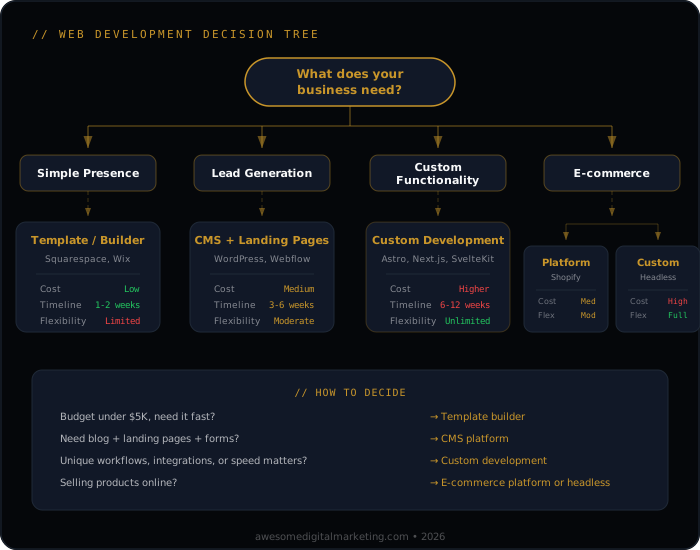
What Are Your Website Development Options?
There are three broad categories, and each one fits a different situation.
Custom Development
Built from the ground up for your specific business. Custom code, custom design, custom everything.
Best for:
- Businesses with unique workflows that off-the-shelf platforms can’t handle
- Companies where the website itself is the product (SaaS, marketplaces, portals)
- Organizations with complex integrations between their website and internal systems
Trade-offs:
- Highest upfront investment
- Longer development timeline (typically 4-8 weeks for a full build with modern frameworks and AI-assisted development)
- Requires ongoing developer support for updates and changes
- Maximum flexibility and performance ceiling
Semi-Custom Solutions
Start with a proven framework or CMS, then customize heavily. You get the foundation handled for you while still controlling the parts that matter.
Best for:
- Businesses that need significant customization but don’t need to reinvent the wheel
- Companies with some unique requirements but standard content management needs
- Organizations that want professional results without a six-figure development budget
Trade-offs:
- Moderate investment
- Faster timeline (typically 2-4 weeks)
- Some limitations based on the underlying platform
- Good balance of flexibility and maintainability
Platform-Based Builds
Use an established platform like WordPress, Shopify, or Webflow and configure it for your needs. Customize within the platform’s ecosystem.
Best for:
- Businesses that primarily need a professional web presence and content management
- Companies with straightforward e-commerce needs
- Organizations that want their internal team to manage day-to-day updates
- Startups that need to launch quickly and iterate
Trade-offs:
- Lowest upfront cost
- Fastest to launch (days to weeks)
- Limited by the platform’s capabilities and ecosystem
- May require migration later as you outgrow it
When Should You Choose Custom Development?
Custom development is a significant investment, so it should solve significant problems. Here are the situations where it genuinely pays for itself.
Unique Business Processes
If your business does something that standard platforms can’t accommodate — a proprietary quoting system, a custom booking workflow, a specialized calculator — custom development lets you build exactly what you need.
The key question: is this unique process a competitive advantage? If yes, building it custom protects and enhances that advantage. If the process is unique just because it’s messy, fix the process first.
Performance Requirements
When milliseconds matter — high-traffic e-commerce, real-time data dashboards, applications serving thousands of concurrent users — custom development gives you control over every performance decision.
Platform-based sites can be fast, but they carry overhead. Custom builds let you optimize specifically for your use case without the weight of features you don’t use.
Brand Differentiation
There’s a difference between “looks professional” and “looks like us.” If your brand identity is a meaningful part of your competitive positioning, a custom-designed site communicates that in a way templates can’t replicate.
This matters more in some industries than others. A creative agency needs a distinctive site. An accounting firm probably doesn’t.
Key Components of Any Web Project
Regardless of which approach you choose, these are the areas that determine whether the project succeeds or becomes an expensive regret.
UX Design
User experience isn’t about making things pretty. It’s about making things work.
What good UX looks like in practice:
- Navigation that matches how people think, not how your org chart looks. Users don’t care about your department structure. They care about finding what they need.
- Clear calls to action on every page. If a visitor finishes reading a page and doesn’t know what to do next, the page has failed.
- Mobile-first design that isn’t just “the desktop site, but smaller.” Mobile users have different intent and different constraints. Design for that.
- Page load speed that respects your visitors’ time. Especially on mobile, every second of load time costs you visitors.
Technical Infrastructure
The decisions you make here affect everything from daily performance to long-term maintenance costs.
Hosting and deployment:
- Choose hosting that matches your traffic patterns. Over-provisioning wastes money. Under-provisioning loses customers.
- Set up proper staging environments so you can test changes without breaking your live site.
- Implement automated backups with tested recovery procedures. Untested backups are not backups.
Security basics:
- SSL certificates (non-negotiable — browsers actively warn users about non-HTTPS sites)
- Regular updates to all software components
- Web application firewall for sites that handle sensitive data
- Proper form validation and input sanitization
Performance foundations:
- Image optimization (this alone can cut page load times in half)
- Proper caching strategy
- Content delivery network (CDN) for geographically distributed audiences
- Lazy loading for below-the-fold content
Business Integration
Your website doesn’t exist in isolation. It needs to connect to the rest of your business.
- CRM integration so leads from your website flow directly into your sales process without manual data entry
- Analytics setup that goes beyond pageviews — track the actions that correlate with revenue
- Email marketing connection so website visitors can enter your nurture sequences
- Payment processing (if applicable) that’s secure, reliable, and provides a smooth checkout experience
- Inventory or scheduling systems that keep your website in sync with reality
How Do You Make the Right Choice?
Start with Requirements, Not Technology
Before you talk to a single developer or agency, document what you actually need your website to do. Not what would be cool. Not what your competitor has. What your business needs to function and grow.
Organize requirements into three categories:
- Must-have — the site literally can’t launch without these
- Should-have — important for effectiveness but not launch-blocking
- Nice-to-have — would be great if budget and timeline allow
Be honest with yourself about which category each item belongs in. “Must-have” should be a short list.
Technical Considerations
Content management: Who will be updating the site day-to-day? If it’s non-technical staff, the content editing experience matters as much as the front-end design. A beautiful site that nobody can update becomes stale fast.
Scalability: Where do you realistically expect to be in 2-3 years? Build for that, not for where you might be in 10 years. Over-engineering for hypothetical scale wastes money and adds complexity.
SEO foundation: Whatever approach you choose, make sure the technical SEO fundamentals are solid from day one. Clean URLs, proper heading structure, fast load times, mobile responsiveness, structured data. Retrofitting SEO into a poorly-built site is painful and expensive.
Accessibility: Building an accessible site isn’t just ethical — it’s good business and increasingly a legal requirement. WCAG 2.1 AA compliance should be a baseline expectation, not an afterthought.
Timeline Reality
Be realistic about timelines, and factor in the time you’ll need to invest, not just the developer’s time.
- Platform-based: 2-4 weeks if you have content ready. Add 2-4 weeks if you don’t.
- Semi-custom: 2-4 weeks for development, plus 1-2 weeks for content, testing, and revisions.
- Full custom: 4-8 weeks with modern frameworks and AI-assisted development. Complex enterprise projects with heavy integrations can take longer.
The number one cause of delayed web projects is content. Design and development can stay on schedule while the project stalls because nobody wrote the copy, gathered the photos, or approved the final pages. Start your content process early.
What Should You Expect to Invest — and What’s the ROI?
Web development costs vary enormously based on scope, complexity, and who’s doing the work. Rather than focusing on the price tag, focus on the return.
Questions that help frame the investment:
- How much revenue does your website currently generate (directly or by supporting your sales process)?
- What would a 10% improvement in conversion rate be worth over 12 months?
- How much time does your team spend on workarounds because the current site can’t do what they need?
- What opportunities are you missing because your website can’t support them?
Common ROI drivers:
- Improved conversion rate — even small improvements compound significantly over time
- Reduced manual work — automation and integrations free up your team for higher-value activities
- Better search visibility — a technically sound site earns more organic traffic, which is the lowest-cost acquisition channel
- Reduced support burden — a well-designed site answers questions before people need to call or email
The maintenance question:
Whatever you build, budget for ongoing maintenance. Websites aren’t “done.” They need security updates, content refreshes, performance monitoring, and periodic redesigns. A general rule: plan to invest 15-20% of the original build cost annually in maintenance and improvements.
What’s the Bottom Line on Website Development?
The right website development approach depends on your specific situation — your business model, your technical requirements, your budget, and your timeline. There’s no universally “best” option.
What is universal: start with clear requirements, choose the approach that fits your current needs (not your hypothetical future needs), invest in the fundamentals (UX, performance, SEO, security), and plan for ongoing maintenance from day one.
The businesses that get the most value from their websites aren’t the ones that spent the most on development. They’re the ones that made a deliberate choice about what they needed, built it well, and kept investing in it over time. A well-built site is the foundation for everything else — your content marketing, your SEO and AI visibility, and your analytics and reporting all depend on it. Explore our website design services or see how a well-built site fits into a broader AI-powered marketing system.
Want to see how your current site performs? Run a free AI Visibility scan — 22 checks, 5 pillars, results in 30 seconds.