CRM Integration: How to Close the Attribution Loop Between Ads and Revenue
Google Ads says your cost per lead is $45. You’re generating 80 leads a month. The dashboard looks healthy. Your account manager says performance is strong.
But when you pull up your CRM, only 12 of those 80 leads became paying customers. The other 68 were tire-kickers, wrong numbers, people who ghosted after the first call, and a handful of spam submissions. Your real cost per customer isn’t $45 — it’s $300.
And Google’s bidding algorithm has no idea. It thinks all 80 leads are equally valuable. It’s optimizing to bring you more of the same mix — spending your budget to attract people who will never buy.
This is the attribution gap that most businesses never close. Your ad platforms know about clicks and form fills. Your CRM knows about revenue. But the two systems don’t talk to each other. Closing that loop is the final stage of a modern tracking stack — and it changes everything about how your ad spend performs.
Why Don’t Ad Platforms Know Which Leads Convert?
Ad platforms track what happens on your website: page views, form submissions, phone calls, purchases. When someone fills out your contact form, Google and Meta record that as a conversion.
But what happens after the form submission — the sales call, the proposal, the negotiation, the close — happens in your CRM, not on your website. Ad platforms have no visibility into that process.
So they optimize for the signal they have: form fills. And a form fill from a qualified buyer looks identical to a form fill from someone who’ll never respond to your follow-up email.
The result: your campaigns get better and better at generating leads. But not better at generating customers. The optimization target is wrong.
How Does CRM-to-Ad-Platform Feedback Work?
The concept is straightforward: when a lead in your CRM reaches a meaningful stage — qualified, proposal sent, closed/won — your CRM sends that event back to the ad platforms that originally generated the lead.
The technical flow:
- Lead submits a form on your website. Google Ads and Meta record the conversion
- Lead enters your CRM with source tracking (UTM parameters, click ID, etc.)
- Sales works the lead. Days, weeks, or months pass
- Lead reaches a milestone (qualified, closed/won, revenue recorded)
- CRM fires a webhook or API call to your server-side GTM container
- sGTM forwards the event to Google Ads (as an offline conversion) and Meta CAPI (as a downstream event)
- Ad platforms learn which clicks and campaigns produce actual customers — and adjust bidding accordingly
Once this loop is running, Google and Meta stop optimizing blindly for form fills. They start optimizing for the leads that actually convert to revenue.
What Data Needs to Flow Back?
At minimum, you need to send:
- Google Click ID (gclid) or Meta Click ID (fbclid) — stored in your CRM when the lead first arrives, so the ad platform can match the downstream conversion back to the original click
- Conversion event name — “qualified_lead,” “closed_won,” “revenue_recorded,” or whatever stages matter in your pipeline
- Hashed customer identifiers — email address and/or phone number (SHA-256 hashed) for platforms that match on identity rather than click IDs
- Conversion value (optional but powerful) — the actual deal value, so bidding algorithms can optimize for revenue, not just lead count
The Click ID Problem
The biggest implementation challenge is capturing and storing click IDs. When a visitor lands on your site from a Google Ad, the URL contains a gclid parameter. That parameter needs to travel from the landing page → through your form → into your CRM as a hidden field.
If you lose the gclid between click and CRM entry, you can’t close the loop for that lead. This is why proper form and tracking setup matters from day one — it’s much harder to retrofit than to build correctly.
Most form builders and CRM platforms support hidden fields that auto-capture URL parameters. Set this up once and it works for every lead going forward.
How Do You Connect Your CRM to Server-Side GTM?
The Webhook Approach (Most Common)
Most modern CRMs support outbound webhooks — automated HTTP requests that fire when a record changes status. The setup:
- In your CRM, create a workflow trigger: “When lead status changes to Qualified” (or whatever stage you’re tracking)
- Configure the webhook to POST to your server-side GTM endpoint (
tags.yourdomain.com/your-endpoint) - Include the payload: event name, gclid/fbclid, hashed email, hashed phone, conversion value
- In sGTM, create a tag that receives the webhook and forwards the data to Google Ads Offline Conversions and/or Meta CAPI
- Test with a known lead and verify the conversion appears in both your ad platform and CRM
This works with any CRM that supports webhooks — HubSpot, Salesforce, ActiveCampaign, Pipedrive, Zoho, or any platform with workflow automation and HTTP request capabilities.
The Direct API Approach
For larger implementations, you can skip sGTM and send conversions directly to each platform’s API:
- Google Ads: Offline Conversion Import API
- Meta: Conversions API with offline event sets
- LinkedIn: Conversions API
This requires developer resources but gives you the most control over timing, batching, and error handling.
Hybrid Approach
Some businesses use their CRM’s native integrations for one platform (e.g., HubSpot’s built-in Google Ads integration) and sGTM webhooks for others. There’s no single right answer — use whatever gets the data flowing reliably.
What Changes When the Loop Is Closed?
Bidding Shifts to Quality
Google’s Smart Bidding and Meta’s Advantage+ campaigns start optimizing for the leads that actually become customers. Your cost per form fill might increase — but your cost per customer decreases, often dramatically.
A common pattern: CPA (form fills) rises from $45 to $60, but cost per closed deal drops from $300 to $180. You’re paying more per lead but getting leads that are 3x more likely to convert.
Budget Allocation Gets Smarter
You can finally see which campaigns, ad groups, and keywords produce revenue — not just leads. That $2,000/month campaign generating 20 cheap leads that never convert? You can reallocate it to the campaign generating 8 expensive leads that close at 50%.
Reporting Becomes Meaningful
Your marketing dashboard can now show end-to-end metrics: ad spend → leads → qualified leads → customers → revenue. This is the reporting that actually proves marketing’s impact on the business — not vanity metrics about impressions and click-through rates.
What Are the Common Pitfalls?
Not capturing click IDs from day one. Retrofitting gclid/fbclid capture is painful. Set up hidden form fields that store URL parameters as soon as your tracking is live. Every lead captured without a click ID is a lead you can never attribute.
Sending conversions too late. Google Ads offline conversions have a 90-day lookback window. If your sales cycle is longer than that, you’ll need to send intermediate stages (qualified, proposal sent) earlier in the pipeline.
Forgetting about time lag. A lead generated in January might not close until April. When reporting on CRM feedback, always account for the delay between click and close. Month-over-month comparisons need to use conversion date windows, not click dates.
Over-engineering the pipeline. Start with one downstream event (qualified lead or closed won) feeding back to one platform (Google Ads). Get that working reliably before adding more stages, more platforms, and more complexity.
Not hashing PII correctly. Google and Meta require SHA-256 hashing for email and phone before you send it. Most sGTM templates handle this automatically, but verify — sending unhashed PII is a compliance issue.
How Does the Full Stack Come Together?
With all four stages complete, your tracking architecture looks like this:
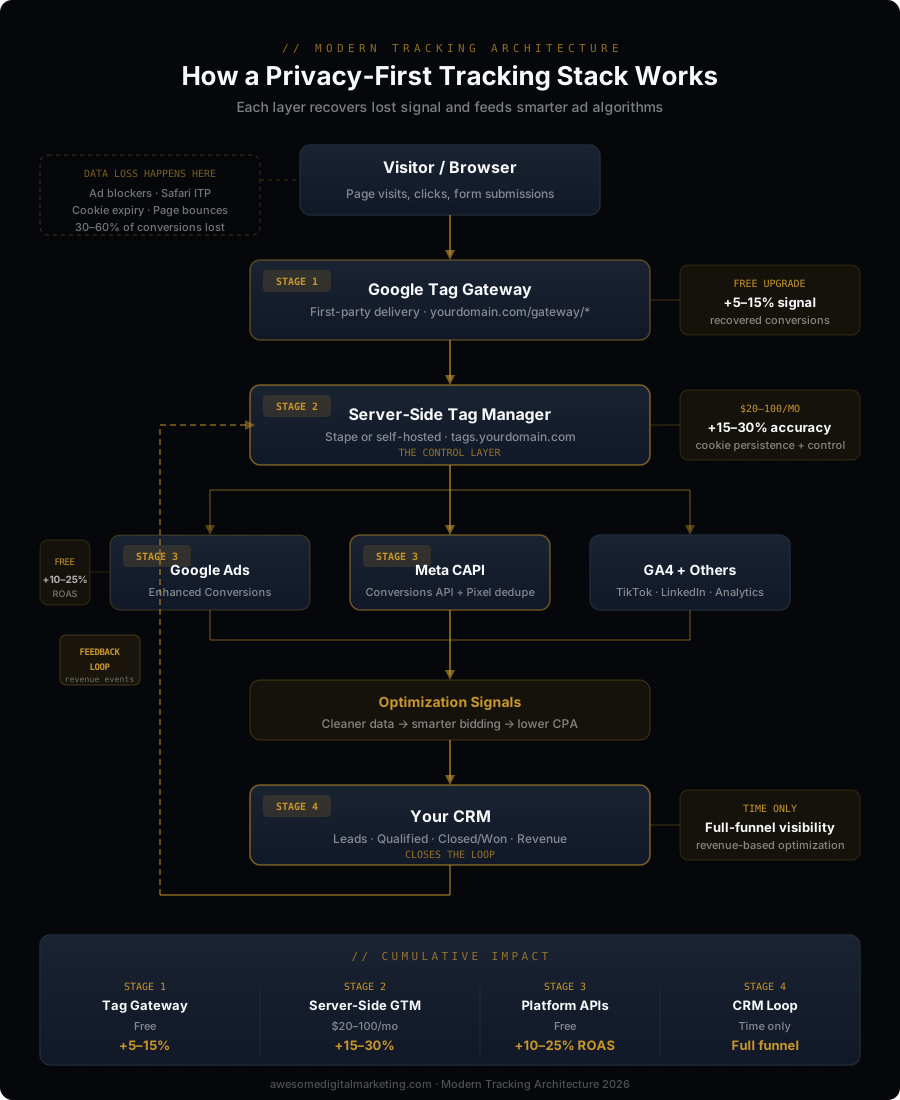
- Google Tag Gateway — first-party delivery, free, recovers 5–15% of lost signal
- Server-Side GTM — data control layer, $20–$100/month, recovers 15–30% more
- Meta CAPI + Enhanced Conversions — cross-platform signal recovery, free, 10–25% ROAS improvement
- CRM Integration — full-funnel attribution, time investment only, optimizes for real revenue
Each layer compounds. The total impact — from better signal to smarter bidding to revenue-based optimization — typically shows as a 15–30% improvement in cost per real customer within the first 60 days.
The businesses that build this stack aren’t spending more on marketing. They’re spending the same amount and getting measurably better results — because their ad platforms finally know what “better” actually means.
See where you stand — check your AI visibility score.