Conversion Rate Optimization: Why More Traffic Isn't Always the Answer
A business spends $5,000 a month on Google Ads. They’re getting 2,000 visitors to their website. Twenty of those visitors fill out a form. That’s a 1% conversion rate.
Their instinct? Spend more on ads to get more traffic. So they double the budget to $10,000. Now they get 4,000 visitors and 40 leads. The math works, but it’s expensive math.
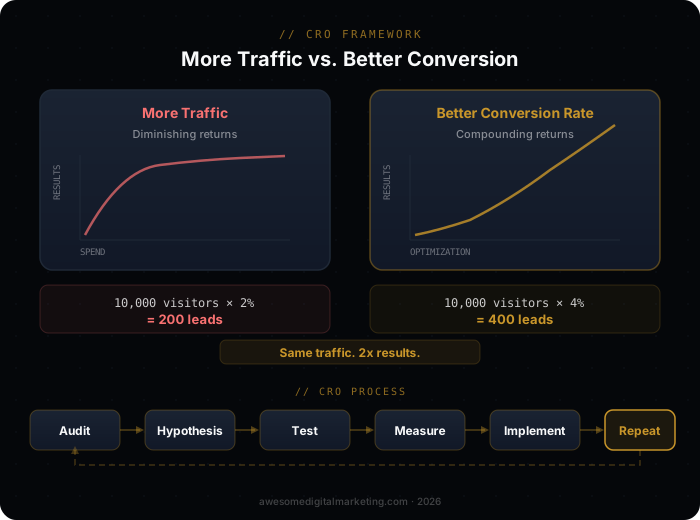
Here’s the thing they didn’t consider: if they fixed their landing page and increased the conversion rate from 1% to 3%, they’d get 60 leads from the original 2,000 visitors — more leads for less money. No additional ad spend required.
This is conversion rate optimization in a nutshell. Before spending more to drive traffic, make sure your website converts the traffic you already have.
What Is Conversion Rate and Why Does It Matter?
The Basic Math
Conversion rate = (number of desired actions / number of visitors) × 100
A “conversion” depends on your business:
- Lead generation: form submission, phone call, chat inquiry
- E-commerce: purchase, add to cart
- SaaS: free trial signup, demo request
- Service business: appointment booking, estimate request
Most websites convert between 1-3% of visitors. Top-performing pages convert 5-10%+. The gap between average and excellent is where growth lives.
Why It Matters More Than Traffic
Doubling your traffic costs money — more ad spend, more content, more SEO investment. Doubling your conversion rate costs almost nothing in comparison. It’s usually a matter of better copy, clearer calls to action, faster page loads, and smarter page layout.
Consider two scenarios for a business where each lead is worth $500:
- Scenario A: 5,000 visitors × 1% conversion = 50 leads = $25,000 in pipeline
- Scenario B: 5,000 visitors × 3% conversion = 150 leads = $75,000 in pipeline
Same traffic. Same ad spend. Three times the revenue. This is why CRO is often the highest-ROI marketing investment a business can make.
Where Do Most Websites Lose Conversions?
Slow Page Speed
Every second of load time costs conversions. A page that loads in 1 second converts at roughly double the rate of a page that loads in 5 seconds. Mobile is even more sensitive — users on phones abandon slow pages faster.
Check your page speed with Google PageSpeed Insights. Focus on:
- Largest Contentful Paint (LCP) — how fast your main content appears. Target under 2.5 seconds.
- First Input Delay (FID) — how fast the page responds to interaction. Target under 100ms.
- Cumulative Layout Shift (CLS) — how much the page jumps around while loading. Target under 0.1.
Common fixes: compress images, defer non-critical JavaScript, use a CDN, and minimize third-party scripts. Your website doesn’t need to be flashy — it needs to be fast.
Unclear Value Proposition
A visitor lands on your page and has about 5 seconds to understand what you do, who you do it for, and why they should care. If your headline doesn’t answer those questions, they leave.
Weak: “Welcome to ABC Marketing — Your Partner in Growth” Strong: “We Help Home Service Businesses Generate Leads That Actually Close”
The strong version tells you the audience (home service businesses), the outcome (leads that close), and implies a problem they solve (leads that don’t close). The weak version says nothing.
Too Many Choices
The paradox of choice is real on websites. When you give visitors too many options — multiple CTAs, sidebar distractions, navigation menus on landing pages, pop-ups competing with the main content — they choose nothing.
Every page should have one primary action you want the visitor to take. Everything else on the page should support that action.
Weak or Missing Calls to Action
“Contact us” is not a compelling call to action. It tells the visitor to do work without promising any value in return.
Weak CTAs:
- “Submit”
- “Contact us”
- “Learn more”
Strong CTAs:
- “Get your free estimate”
- “See your AI visibility score”
- “Book a 15-minute strategy call”
Strong CTAs promise a specific outcome and reduce perceived risk. “Free,” “your,” and specific timeframes all increase click rates.
No Social Proof
People trust other people more than they trust your marketing copy. If your landing page doesn’t include evidence that others have succeeded with you, visitors have no reason to believe your claims.
Effective social proof:
- Customer testimonials with names, photos, and specific results
- Review scores from Google, Yelp, or industry platforms
- Case studies with measurable outcomes
- Client logos (if B2B)
- Number of customers served or projects completed
Place social proof near your CTA — that’s where hesitation happens and where proof has the most impact.
Forms That Ask Too Much
Every field you add to a form reduces completion rates. Name and email converts better than name, email, phone, company, title, budget, and timeline. You can collect additional information after the initial conversion.
For lead generation:
- Minimum viable form: Name + email or phone
- Acceptable form: Name + email + one qualifying question
- Conversion killer: More than 4-5 fields on initial contact
If you need detailed information, use a two-step process: capture the lead with a short form, then follow up with qualifying questions.
How Do You Find What’s Broken?
Check Your Analytics
Your analytics setup should tell you where visitors drop off:
- Bounce rate by page — which pages do visitors leave immediately?
- Exit rate by page — which pages are the last ones visited before leaving?
- Conversion rate by traffic source — do Google Ads visitors convert differently than organic visitors?
- Device breakdown — is mobile converting much worse than desktop? (It usually is.)
- Page flow — what path do visitors take, and where do they abandon it?
If your analytics aren’t set up to answer these questions, that’s the first thing to fix.
Use Heatmaps and Session Recordings
Analytics tells you what’s happening. Heatmaps and session recordings tell you why. Watch real visitors interact with your pages:
- Where do they click? Are they clicking on elements that aren’t clickable?
- How far do they scroll? Is your CTA below the fold where nobody sees it?
- Where do they hesitate? Cursor hovering over a form field before abandoning suggests confusion.
- What do they ignore? That section you spent hours designing might be invisible to real users.
Run User Tests
Ask 5-10 people who match your target audience to complete a task on your website: “Find out how much it costs to get a marketing audit” or “Request an estimate for SEO services.” Watch what they do. The friction points will be obvious — and often surprising.
What Should You Test First?
Not everything needs testing. Start with the changes most likely to impact conversions:
Priority 1: Above-the-Fold Content
The headline, subheadline, and primary CTA that visitors see without scrolling. This is where most conversions are won or lost. Test:
- Headline variations — different value propositions, benefit-focused vs. pain-focused
- CTA button text — “Get Started” vs. “See Your Score” vs. “Book a Free Call”
- CTA button color and placement — make it visually dominant
- Hero image or video — does visual content help or distract?
Priority 2: Form Design
If your conversion action is a form submission, optimize the form:
- Number of fields — remove anything you don’t absolutely need for initial contact
- Field labels — clear, specific labels reduce confusion
- Button text — “Submit” is generic; “Get My Free Estimate” is specific
- Form placement — above the fold, or after establishing value?
Priority 3: Social Proof Placement
Test where testimonials and reviews appear:
- Near the CTA — reduces hesitation at the decision point
- After the value proposition — supports your claims with evidence
- In a dedicated section — builds credibility before the ask
Priority 4: Page Structure
- Long page vs. short page — sometimes less is more; sometimes comprehensive converts better
- Section order — does leading with benefits outperform leading with features?
- Navigation presence — on landing pages, removing navigation often increases conversions by eliminating escape routes
How Does CRO Connect to Your Broader Marketing?
Better Conversions Lower Ad Costs
When your landing pages convert better, your cost per lead drops. This means your paid advertising budget goes further. A 1% improvement in conversion rate can save thousands in monthly ad spend while generating the same number of leads.
Google Ads also rewards high-converting landing pages with better Quality Scores, which means lower cost per click. CRO and paid advertising amplify each other. The right web development approach builds conversion into the foundation — so optimization starts with architecture, not afterthoughts.
SEO Benefits from Better UX
Google measures user engagement signals — bounce rate, time on page, pages per session. A website that converts well typically has better engagement metrics, which can improve organic rankings. Your SEO strategy and your CRO strategy aren’t separate — they’re reinforcing.
Email and Content Convert Better with Optimized Landing Pages
Every email campaign and content marketing piece drives traffic somewhere. If that destination converts poorly, the entire campaign underperforms — regardless of how good the email or content was. CRO ensures your content investments pay off.
What Does a CRO Process Look Like?
Step 1: Measure Your Baseline
Before changing anything, document current performance:
- Overall site conversion rate
- Conversion rate by top landing pages
- Conversion rate by traffic source
- Conversion rate by device
You can’t improve what you haven’t measured.
Step 2: Identify the Biggest Opportunity
Look for the page with the most traffic and the worst conversion rate. That’s your biggest opportunity — improving conversion on a high-traffic page produces the most absolute gain.
Step 3: Form a Hypothesis
Don’t just change things randomly. Form a specific hypothesis: “We believe that reducing the form from 7 fields to 3 will increase form completion rate by 20% because analytics shows a 60% abandonment rate on the form.”
Step 4: Test One Thing at a Time
Change the form. Measure the result. If it improved, keep the change and move to the next hypothesis. If it didn’t, revert and try a different approach.
Testing multiple changes simultaneously makes it impossible to know what worked.
Step 5: Implement and Repeat
CRO isn’t a project with an end date. It’s an ongoing process of measurement, hypothesis, testing, and implementation. The best-converting websites are the ones that never stop optimizing.
The Bottom Line
Most businesses don’t have a traffic problem. They have a conversion problem. The visitors are already there — they’re just not converting.
Before spending more on ads, SEO, or content, look at what happens after someone arrives on your site. Fix the leaks first. Then scale the traffic.
The combination of AI-powered marketing and disciplined CRO creates a compounding effect: AI drives the right traffic to your site, and optimized pages convert more of that traffic into leads. The result is more revenue from the same marketing spend.
Want to see where your site stands? Run a free AI Visibility scan — it evaluates your digital presence across the factors that drive both visibility and conversions.